Cisco Switches Alerting
Real-time alerts for Cisco IOS/IOS-XE switches. This example focuses on STP BPDU Guard violations, but the same pattern applies to any log source.
This is a reference implementation. The mechanisms shown here (query filtering, field extraction, throttling, templating) work the same way for any log type: Linux syslogs, application logs, firewall events, etc.
Log Flow
Cisco Switch (syslog)
       ↓
VictoriaLogs
       ↓
Valerter (streams & alerts)
       ↓
Mattermost / Email
Sample Log
A BPDU Guard violation stored in VictoriaLogs:
{
  "_time": "2026-01-15T16:10:00.000Z",
  "_msg": "2290: CORE-SW-01: Jan 15 16:10:00.000: %SPANTREE-2-BLOCK_BPDUGUARD: Received BPDU on port Gi1/0/24 with BPDU Guard enabled. Disabling port.",
  "hostname": "192.168.1.1",
  "site": "DATACENTER",
  "severity": "2",
  "level": "critical",
  "group": "SW"
}
How Valerter Processes It
Each step below is a reusable building block. Adapt them to your own logs.
1. Query — Select Which Logs to Monitor
query: 'group:"SW" "SPANTREE-2-BLOCK_BPDUGUARD"'
The query uses LogsQL syntax to filter logs in real-time:
group:"SW"— matches only logs with this field value"SPANTREE-2-BLOCK_BPDUGUARD"— full-text search in_msg
Adapt it: Change the filter to match your logs. Examples:
app:"nginx" "502 Bad Gateway"— nginx errorslevel:"error" service:"payment"— payment service errors_msg:~"failed.*authentication"— regex match on message
2. Parser — Extract Fields from Logs
parser:
  json:
    fields: ["hostname", "site", "severity", "_msg", "level"]
  regex: '^\d+: (?P<switch_name>[A-Z0-9-]+):'
Two extraction methods work together:
| Method | Purpose | Result |
|---|---|---|
| Regex | Extract data embedded in _msg |
Named group (?P<switch_name>...) creates switch_name variable |
| JSON | Pick fields of the VictoriaLogs event by path | hostname, site, severity become variables (a dotted path such as data.host gives host) |
Adapt it:
- If your logs are JSON, list the fields you need
- If you need to parse unstructured text, use regex with named capture groups
(?P<name>pattern) - You can use both together — the regex is applied to
_msgfirst, then thejson.fieldspaths are read
3. Throttle — Prevent Alert Spam
throttle:
  key: "{{ switch_name }}"
  count: 3
  window: 5m
Throttling groups alerts and limits notifications:
| Setting | Effect |
|---|---|
key |
Groups alerts by this value (template syntax) |
count |
Maximum alerts per group per window |
window |
Time window before counter resets |
With the config above: max 3 alerts per switch per 5 minutes.
Adapt it:
key: "{{ hostname }}"— throttle per hostkey: "{{ error_code }}"— throttle per error typekey: "{{ hostname }}-{{ service }}"— throttle per host+service combo- Remove
keyentirely — global throttle across all matching logs
4. Notify — Route to Destinations
notify:
  template: "SPANTREE-2-BLOCK_BPDUGUARD"
  destinations:
    - mattermost-infra
    - email-infra
Each rule must specify:
template— which template to use for formattingdestinations— list of notifiers to send to (defined innotifierssection)
5. Template — Format the Notification
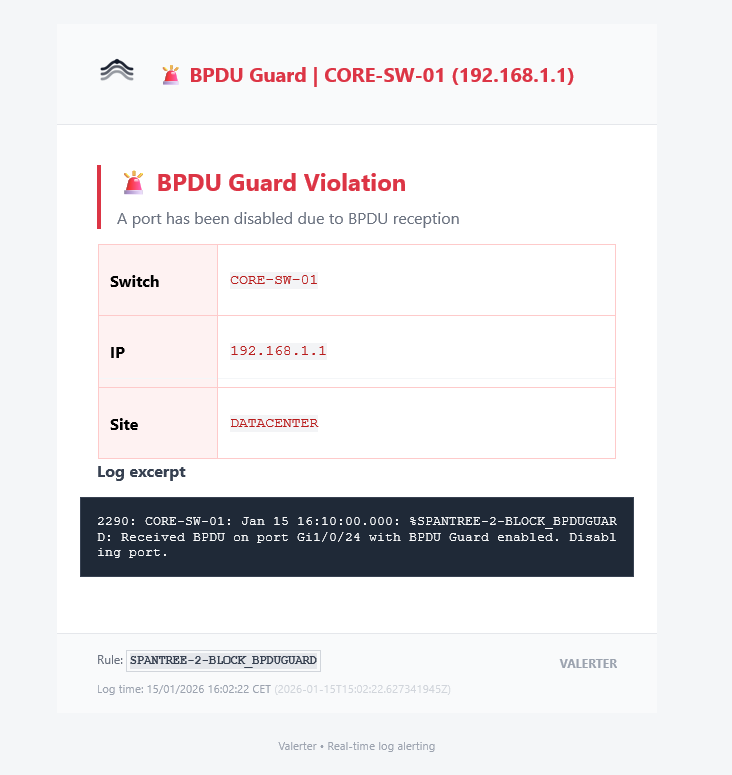
The rule template uses Jinja2 syntax with the event fields at top level (see the template guide):
templates:
  SPANTREE-2-BLOCK_BPDUGUARD:
    title: "🚨 BPDU Guard | {{ switch_name }} ({{ hostname }})"
    body: |
      **Switch:** `{{ switch_name }}` | **IP:** `{{ hostname }}` | **Site:** `{{ site }}`
      ```
      {{ _msg }}
      ```
    email_body_html: |
      <!-- HTML version for email -->
Available variables:
- All fields of the event, including those extracted by the
json.fieldspaths - All regex named groups
_msg— original log messagerule_name— name of the triggered rulevl_source— name of the VictoriaLogs source the event came from
log_timestamp_formatted (human-readable timestamp) is not available in a rule template: it exists only in notifier templates, such as the subject_template of the email notifier, and in the Mattermost footer. See Rule templates and notifier templates.
Result
Mattermost:

Email:
Other Cisco Alerts
Just change the query to monitor different events:
| Alert Type | Query |
|---|---|
| Hardware warnings | group:"SW" "PLATFORM-4-ELEMENT_WARNING" |
| SFP threshold | group:"SW" "SFF8472-3-THRESHOLD_VIOLATION" |
| VLAN mismatch | group:"SW" "CDP-4-NATIVE_VLAN_MISMATCH" |
| Stack link change | group:"SW" "STACKMGR-4-STACK_LINK_CHANGE" |
| Switch restart | group:"SW" "SYS-5-RESTART" |
| All critical (0-2) | group:"SW" severity:~"[0-2]" |
Full Configuration
See config.yaml for the complete working configuration.